Self-ImprovementSep 26, 2026
The CS Student Trap (that applies to life too!)
by Albert Tan

So, I’m sure we have all been there before, a new idea or maybe something interesting has piqued your interest. You had dived as deep as you could and feel ready to tackle the challenge. The first day? Amazing. The second and third? Meh. And then it all goes downhill from here.
I want to note that this is solely my opinion and is not backed by science at all. All vibes!
Skip to the end for a summary table of what I tried, and which was most effective.
The main idea of this article is procrastination. Given that I am a human being, I’ve faced this issue lots of times; university assignments, personal projects, etc. You name it, I’ve done it. I was even facing procrastination troubles when writing this article.
So how did I try to fix it? Notion? Obsidian? Todoist? A framework?
Slow down. Breathe. Here, have some patience. To know how to tackle procrastination, you must first understand what causes it. It’s not as simple as being too lazy to do anything. I would categorize them under these ideas:
- Mind Clutter: Priority Overload
- Mind Clutter: Task Overload
- Perfectionism
- High Activation State
- Perpetual Planning
- Optimism Bias
Here's a mindmap to give you some examples. To better illustrate what I mean, I’ll bring in some examples from my own personal experiences.
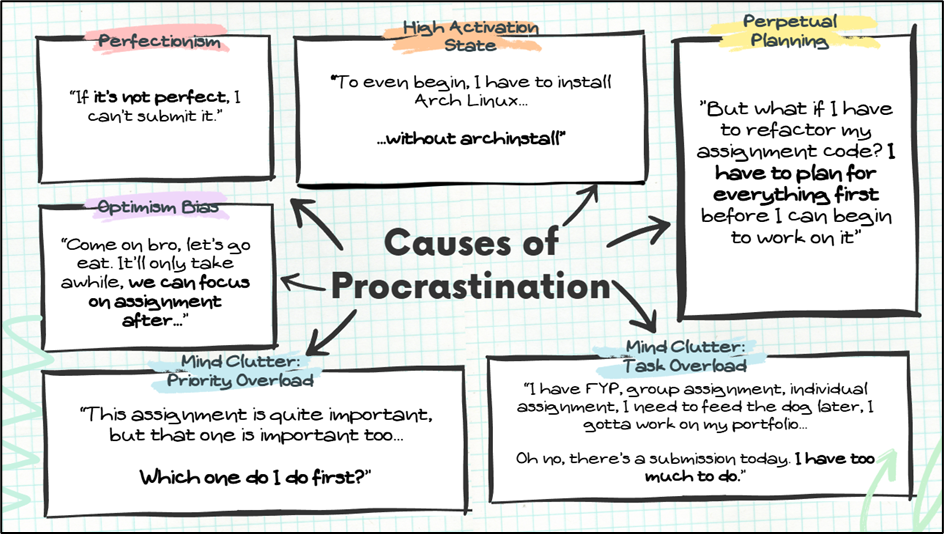
The Causes of Procrastination
Mind Clutter: Priority Overload
The obvious one would be assignments. The university schedule is usually like this: nothing, nothing, and then BAM! HERE’S EVERYTHING AND IT’S ALL DUE BACK-TO-BACK. I would categorize this as mind clutter with too many tasks where all of them are far too important to put on the backlog. Now, you are faced with decision paralysis when deciding on which one to do first.
High Activation State
Let’s say you have a web development project that requires a specific environment to build and test; you did everything, you’ve made the requirements.txt, you’ve made the .gitignore. Yet, you still put off working on the project. I would categorize this as a task that requires high activation state to even start.
Simply put, it is too much of a hassle to continue the project because you have to set up this, configure that, and only then you can begin to work on it. It feels like a chore.
Mind Clutter: Task Overload
Cleaning up your desktop, mopping the floor, taking a parcel in, you still have assignments, and you must work on your portfolio? There is just so much to do with so little time. You start to panic and begin worrying about having too many things to do rather than working on them. This would be task overload.
Perfectionism
Maybe the setup prior to working on something must be perfect, or maybe even the website you are working on can’t have any mistakes – the UI design, functionality, and actual usability has to be perfect. You can’t risk any part of it being wrong. It makes me dread working on something; hence, putting in in the backlog. Indefinitely.
Perpetual Planning
This is the most ironic one that I’ve faced. When in the deepest darkest depths of planning, you tend to feel like you are executing the project. You’re not. It’s just planning. But because planning is so easy to do and feels so fulfilling, I find myself wasting time just planning things out. Never actually working on them. The irony is when I place higher priority on planning a random project over something that needs my immediate attention.
Let’s look at it from another perspective, you could say “I’ve already planned it, it should be easy to do”. In reality, it was only easy to plan, not easy to execute.
Optimism Bias
Ever went out with your friends thinking you’d do work together but end up just talking to each other for hours? That’s what optimism bias is about: overestimate positives and underestimate negatives. Here’s another example, “I’ll go out with my friends first and work on it later”. Once you’re home, you suddenly have chores to do and you’re too tired to work on it. So, you push it to tomorrow morning. The caveat? You slept late, woke up around 10am and have a class to rush to.
How did I 'fix' it?

To be completely honest, I didn’t fix it. I still often fall into its clutches. What changed is being more aware when I was beginning to slip. This led to me coming up with different techniques of dealing with my procrastination. Instead of explaining in paragraph (and bore-ing you out even more), the table below should be concise and easy to understand.
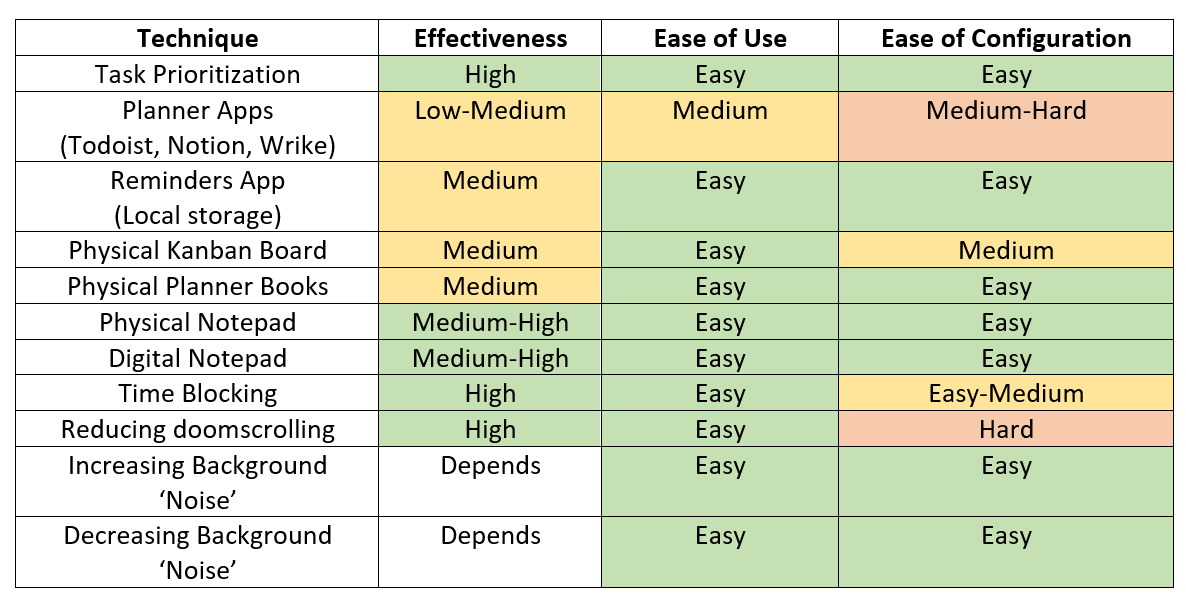
Task Prioritization
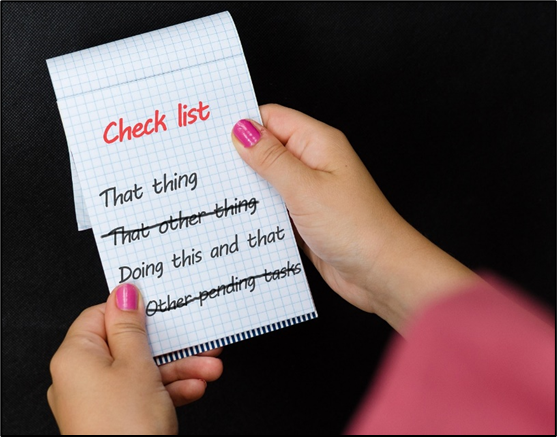
It may sound simple and obvious, but some people really don’t prioritize their tasks. Let’s use the example of university assignments for this. All it takes is one or two hours of reading the assignment questions and prioritizing them based on how easy you perceive it to be. I recommend completing from easy to hard because the mental load decreases with each assignment done.
Do note, while it may be tempting to work on the assignment you are most interested in first, I wouldn’t recommend it. You run the risk of hyper-fixating on that assignment and ignoring the rest.
Planner Apps
While some people really push for apps like Todoist or Notion, I don’t prefer it. There is too much ‘upfront cost’ where you must learn the ecosystem, build the habit to use the app, or face random small issues. For example, when using Notion, the local storage doesn’t update on each online sync.
Built-in Reminders App and/or Digital Notepad
This could be the Reminders app for iPhone, Notes for Android, or Notepad for Windows. I like using it because it is stored locally and then synced to the cloud rather than the other way around. I can create simple to-do lists or even list down a random idea anywhere. However, the effectiveness is medium because you must build the habit of consistently checking and updating the app with the latest tasks.
Physical Solutions
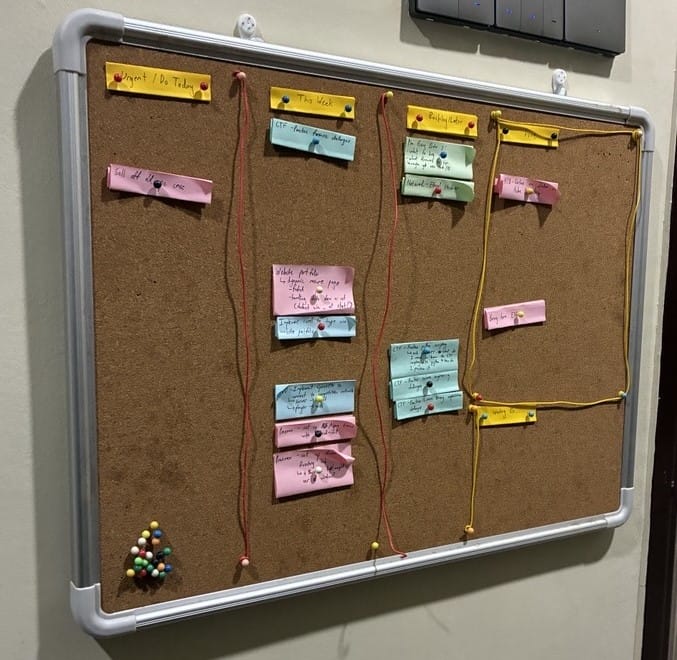
This includes a Kanban board and a notebook that optionally has a planner section. The main issue with the Kanban board is buying a whiteboard or corkboard and the initial setup. A notebook is much cheaper but does not offer automatic online backups. The reminders app doesn’t face this issue because our phones are considered always accessible. This means that if you left your notebook at home or didn’t look at the Kanban board before leaving your house, you may have the wrong idea of which task is prioritized first or you may have forgotten what tasks you have altogether.
Time Blocking
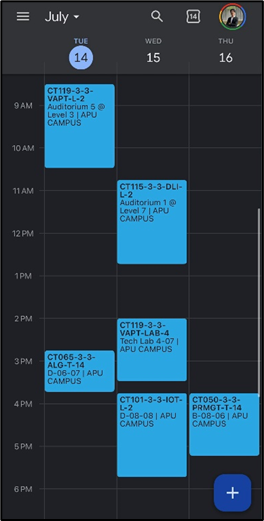
I would recommend using Google Calendar; it seamlessly links between the mobile app and website. While it does have an upfront setup cost (such as learning how it works and getting used to opening the app), it is extremely effective in helping you decide when you are free to do work or to relax.
Reducing Doomscrolling

Whilst arguably the hardest technique to successfully implement, it is possible with apps such as Jomo which limits your screentime. It works by forcing you to wait and think before unlocking the app. However, if you already have the habit of scrolling, you will figure out ways to bypass the lock after some time of using it. For example, instead of unlocking the app for 5 minutes at a time, you may unlock it for an hour instead.
Background Noise
You can either reduce background noise (e.g., sitting in the library) or increase background noise (e.g., listening to music or putting a video in the background). I find that different moments require different techniques which is why it has an effectiveness of ‘depends’. When reducing background noise doesn’t work, it usually means my mind is too noisy or gets very sensitive to distractions. On the other hand, increasing background noise has to be done right.
For example, the music or video must be unintelligible such as songs with no lyrics or videos that you often rewatch. For it to be effective, it must disappear into the background. I find that when singing along to a song that was freshly discovered or watching a new video, my mind gets distracted by it.
Which techniques do I use?
I consistently use a combination of task prioritization, the built-in reminders app and notepad, and manipulating background noise. The rest mentioned here are not as commonly used. The main idea behind my implementation of these techniques is constantly rotating which ones I use so that they are fresh in my mind. However, this is also an issue as it completely blocks me from using apps made for this purpose; hence, my dislike towards planner apps.
All this time spent in figuring out what works for me also led me to understand myself more and learn to accept myself for who I am. Simply put, fighting procrastination is not something you truly fix, but rather something that you work in tandem with.
Now that you’re done reading all this, let me give you some homework. I want you to pick a technique that you’ve never tried before – any of them from the table above – and try to really think about it and implement it for at least 3 days.
At the end of it, I want you to answer these questions below:
- Be honest with yourself, did you actually implement and follow it properly?
- Did it make any impact(positive and/or negative) to you? List it down.
- Based on the impact, what would you change regarding your implementation of the technique?